Latest Post :
Recent Post

What does Ø Symbol on Lenses Mean?


Ø Symbol on Lens
Ø Symbol on Lens


Ø symbol (more like a 0 with a strike through) is used on camera lenses to indicate the diameter of the screw mount on the front of the lens.

Different lenses have different diameter screw mounts even if they are all used on the same camera. For example the 18mm-55mm kit lens that comes along with most cameras have a diameter of 58mm where as the 50mm f/ 1.8 which is one other very popular lens known as the nifty-fifty has a diameter of 52mm.


Ø Symbol on Camera Lens

The Ø number could also be seen on the reverse side of your lens cap and it is to be referenced when choosing lens filters (UV, ND, GND, CPL etc) lens caps, lens hoods etc.


Ø Symbol on Camera Lens

You need to make sure the Ø size and the size of the filters match; for example Ø 77mm to 77mm. One should also consider the Ø size of the lens when purchasing a Lens Reverse Ring (for reverse mounting lenses) for macro photography.

Download Opera Mini browser for Android

Opera Mini browser for Android
This is the world’s fastest Android browser. You must have this android apps if you like surfing the internet. With over 250 million people  around the globe love the Opera Mini web browser. Opera Mini is the best web browser for phones made by Samsung, Sony and Gionee.

Apps features:
- SPEED: Even webpages with lots of images and graphics load in a snap.
- SAVINGS: Cut data costs by up to 90% with our unique compression technology.
- SIMPLICITY: Bigger buttons and a clear layout make Opera Mini easy to use for everyone.
- STABILITY: Go further on the web with a browser that can keep up with you.
- SOCIAL: Opera Mini plays well with others. It works on just about any phone that can connect to the internet!

New and improved features include:
- Set all your favourite websites on the home screen of your browser with Speed Dial. There’s no limit to the number of entries you can add.
- Find out what’s happening with Smart Page. It delivers instant updates from Facebook, Twitter and the latest news.
- Multitask and switch between open pages with tabs.
- Save pages to read later, or for times you’re not connected to the internet.
- Get music, movies and more when it’s convenient for you with the download manager.

Screenshot:
Opera Mini browser for Android - screenshot

Opera Mini browser for Android - screenshot


What's New - Version: 7.5.3!
-This latest version of Opera Mini contains a variety of bug fixes, along with stability and performance improvements.
-Opera Mini 7.5 makes your Android device smarter with Smart Page. It gives you a dashboard view of the latest activity on your social networks, along with automatic news feeds from your favorite sites. Need a sneak peek or the full update? You’ll be able to stay informed about everything that matters to you.

Requires Android: 1.5+
Download file: 1MB (Opera Mini browser v7.5.3.apk)

Download apk file


Metegol v1.1 APK

Metegol - foosball android games

Enjoy a round of foosball anytime you want with your android phone. Download Metegol and let's play this great android games. The Foosball players have been playing against each other for 20 years, trapped within the limits of the table. United for the love of football, united by friendship.

They're united by a rod! But not any more! The Foosball characters are free and ready to go out and play on any terrain, against any adversary, with their chests puffed out and jerseys on. Goal Crusaders!
Pass the ball between your players and dodge the opponents, capture coins, overcome obstacles and make as many goals as you can! Advance through the game and unlock the training and challenge modes.

Requires Android: 2.2
Download file: 43MB (Metegol v1.1 APK)


Psychedelic Prairie LWP v1.1 APK

I believe you has been download best android live wallpapers, that is Galaxy S3/S4 Live Wallpaper. Psychedelic Prairie LWP is second choice live wallpaper for your android. This android app has floating clouds with background windmills, touch-and-shake interactive objects and a hot-air balloon showing battery usage.

Psychedelic Prairie Live Wallpaper,Towering windmills upon stand in the filmy prairie with Waving clouds, fireflies are flashing, that makes you feel like being a fairy world. When you tap, slide, long press the screen and shake your phone, the screen will show different animation.


App Features:
1. Screen animations:
- waving cloud and hot air balloon
- a jet paints patterns in the sky
- fireflies float in the prairie
2. Interactive effects:
- slide screen to show petals
- long press screen to show rainbow
- shake phone to show colorful bubbles
- tap fireflies, the fireflies will shine
- tap or drag hot air balloon shows small balloons,
- tap small balloons, they will burst
3. Hot-air balloon: showing battery usage

Screenshot: 
Psychedelic Prairie LWP - Screenshot

Requires Android: 2.2+
Download file: 3MB (Psychedelic Prairie LWP v1.1 APK)

Download apk file


How to turn any Lens into a Macro Lens the Lens Reversal Technique


Macro photography is one genre of photography which many photographers wish to try their hand at, but often find their current equipment limiting in what they could do. Some make the plunge; spend the extra money on equipment and some simply put off their macro ambitions. Even among those who invested in equipment only a small percentage will actually master the art as macro photography just as any other genres of photography is definitely not for everyone.  So how do you know if you have what it takes to become a successful photographer? Well you could either borrow or rent the equipment or try various techniques which we will be covering in a series of articles here at school of digital photography.

First off the simplest; no cost solution to amazing macro photography, the lens reversal technique.

What you need to do this exercise


1. A DSLR Camera
2. Lens (any type of lens from any manufacturer would do).

Well this is the best part; you could use any camera and lens combination (canon camera + Nikon lens etc). This technique will work on any type of lens from wide angle to tele photo with varying degree of success. In general remember, the shorter the focal length the greater the magnification and vice versa.

Macro Lens Reversal Photography – Step by Step Tutorial


1. Remove the lens from your camera.


Do this in a pollution free environment else chances are more that you will get dust inside of your camera and on the sensor.

2. Flip the Lens Over 


lens reverse macro tutorial
use your left arm to hold the lens in place


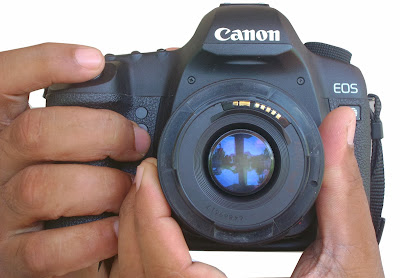
Flip the lens over and hold it place with your left arm, 

macro photography reverse lens technique
hold lens properly aligned with the camera body to prevent light leaks.

make sure the lens and the camera body is aligned properly to avoid light leak (stray light from entering through the gap between lens and camera body).

3. Focus by moving closer or farther


When the lens is reverse mounted it loses all electrical contacts with the camera body so it is no longer possible to use auto focus. In lens reversal macro work the trick to attain focus is to move your camera (camera+lens) closer or farther from the subject to focus. Thus you could focus on different parts of the subject by varying the distance between the subject and the camera.

4. Shoot in Manual Mode


Now all you need to do is put your camera in manual mode, find yourselves a subject to shoot, get real close to the subject and shoot. Since there is no electrical contact between the camera and the lens, feature such as autofocus, aperture etc won’t work, all you need to do is set your shutter speed right depending upon the lighting conditions.

5. Use Higher ISOs


At least until you get the hang of things and feel comfortable try shooting at higher ISO settings, ISO 400 or ISO 800, this will make sure you are shooting with fast shutter speeds and will decrease the chances of the image being spoiled by camera shake.

Principle Behind Reverse Lens Macro


Here is a pictorial representation explaining why a lens is able to focus closer and magnify subjects when it is held in reverse.


Principle of reverse lens macro photography


When mounted normally a lens focuses light from far away so that the image is much smaller and can be recorded by the digital camera sensor; when we reverse mount the lens it does the opposite and the lens magnifies the view in front of it thus effectively turning it into a powerful macro lens.

Remember holding the lens correctly aligned while shooting is in itself a major challenge; when you look through a macro lens, you’ll find the world in a whole new perspective, it might even seem strange or even alien; add to it the need to focus manually (by moving the camera and lens combo forward and backwards) which most beginners are not used to, to top all that is the task of correcting exposure. Yes shooting macro could prove to be much tougher than you might have thought, but with practice you will soon get the hang of things and everything will seem much easier.

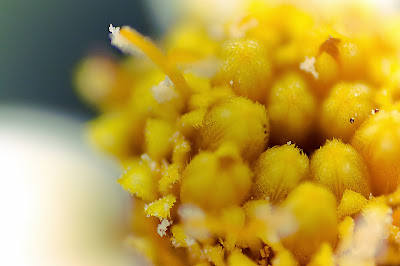
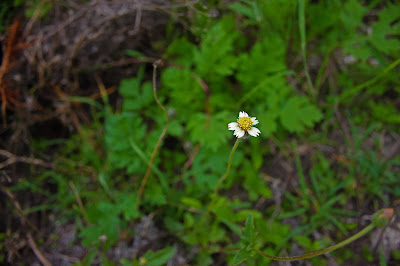
Lens reversing was our first try at macro, do give it a try, shoot some subjects that are both interesting and at the same time easy for a couple of days, flowers might be a good subject to get started, here are some example shots to help you get an idea of the amount of magnification possible with a standard 18 - 55 kit lens on a Canon 500D.
lens reversal macro photography
A small flower shot at 18mm - This is the maximum magnification possible at 18mm, focused at the lens minimum focusing distance.

reverse lens macro closeup photography
The very same flower shot at 55mm - Again this is the maximum magnification possible at 55mm, focused at the lens minimum focusing distance.

reverse lens macro photography technique
Lens reversed at 55mm now iam able to almost fill the frame with the flower.

macro photography lens reversal tutorial
Lens reversed at 18mm - remember the wider the lens the greater the magnification.


Do give this technique a try and if you like the results it’s time to invest a few dollars into a simple piece of equipment which will make lens reversal technique for macro a whole lot easier. In the next article we will discuss Reverse Lens Macro with a Lens Reverse Ring.

By: Jishnu Satheesh Babu do check out some of his amazing revere lens shots on Facebook, Flickr and 500px.

Galaxy S3/S4 Live Wallpaper v1.4.2 APK

Galaxy S3/S4 Live Wallpape
Do you want android devices look different? Live wallpapers can really make the homescreens of your Android devices look alive and interesting. This is one of the best android wallpapers the name is Galaxy S3/S4 Live Wallpaper. Download the free Galaxy S3/S4 Dandelion live wallpaper featuring flying seeds.

Wallpaper comes with X-Ray version, new Galaxy S4 and Google edition wallpaper background!
Beautiful calming "Water Droplet" effect! Enable this effect in the settings screen. Touch or tap the screen to add water drops on your home screen!
To use: Home -> Menu -> Wallpapers -> Live Wallpapers
This live wallpaper has been tested on latest devices such as Samsung Galaxy S4, Nexus 7, HTC One and Sony Xperia Z.

Enjoy beautiful water-droplet and sound effects, complete with S3, S3 Ray, S4 and Nexus modes, plus other settings.

Screenshot:
Galaxy S3/S4 Live Wallpaper - screenshot

Requires Android: 2.1+
Download file: 2.8MB (Galaxy S3/S4 Live Wallpaper v1.4.2 APK)

Download apk file


Can Knockdown 3 v1.24 APK

Can Knockdown 3
Do you like challenge? This android game will tested your mind, Be accurate! Be smart! Be quick! Download apk file and let's play Can Knockdown 3.

Challenge your aim, hone your precision, and push your puzzle-solving skills to the next level in this insanely addictive game. This installment takes the critically acclaimed Can Knockdown series to all new heights- the physics-based carnival gameplay you know and love- and adds unique puzzles, adrenaline-charged challenges, and even more explosive action! A SMASH hit series!

Game features: 
• Multiple challenging levels in beautiful 3D locations
• Puzzles from Easy to Tricky… can you knock them ALL down?
• Show off your skills and challenge your friends!
• Multiple achievements and badges… collect them ALL!
• Gorgeous 3D graphics
• Amazing realism, perfectly-tuned physics engine, easy-to-use controls
• Gameplay boosts like multipliers, bonuses, and so much more!
• Unlock new levels, open new locations, and discover hidden secrets!
Ready… set… THROW!

Screenshot:
Can Knockdown 3 - screenshot

Can Knockdown 3 - screenshot

Requires Android: 4.0+
Download file: 12MB (Can Knockdown 3 v1.24 APK)

Download apk File

 
Support : Creating Website | Johny Template | Mas Template
Copyright © 2011. Technology Share - All Rights Reserved
Template Created by Creating Website Published by Mas Template
Proudly powered by Blogger