Overview
The Sharp AQUOS Crystal is a unique new phone offered exclusively on Sprint, Boost, and Virgin Mobile. It can also be activated on Ting. The near bezel-less design is the most striking thing about this device and to accomplish that Sharp has made some bold design choices: it has tiny bezels, no headset speaker, the front-facing camera is at the bottom of the device, and its screen is made of acrylic instead of glass.
For those of us in the United States, we do not often think of Sharp as phone manufacturer because their devices rarely make it here. However, Sharp is a Japanese electronics company that has been selling smartphones that are popular in Japan for quite some time. This new offering by Sprint in the US likely has much to do with Sprint’s new Japanese owner, Softbank, which has close ties with Sharp in Japan.
Before we go any further, we need to talk about the price. Off-contract the Sharp AQUOS Crystal is $240 from Sprint and only $150 from Boost and Virgin Mobile. It can be found at retailers such as Amazon and Best Buy for even less. That very low price will influence the way we look at and talk about this phone - it is not a flagship device and shouldn’t be judged by the same criteria as devices that cost much, much more. This review unit is the Boost Mobile variant, but my observations can be applied to the other variants as the differences are only in the back color and packaging.
Pros & Cons
Pros - Unique nearly bezel-less design
- Excellent display quality
- Very compact for a device with a 5” display
- Expandable storage up to 128 GB with a microSD card
- Good battery life
- Low price of just $150 off-contract
Cons - Entire phone is made of plastic materials
- Distortion/refraction from chamfered display edges
- Backlight visible at certain angles
- Only available on Sprint networks
Below are my review ratings. Overall the Sharp AQUOS Crystal receives 4.1 out of 5 stars.
Hardware & Design
The most striking aspect of this device is what is not present - the top and sides of the AQUOS Crystal are nearly bezel-less. The bottom bezel can appear somewhat prominent because of this in pictures, but it is not as noticeable in person. To put it in perspective, the bottom bezel is the same height as the bottom bezel of an iPhone 5s.

The bottom bezels of an iPhone 5s on the left next to the Sharp AQUOS Crystal on the right.
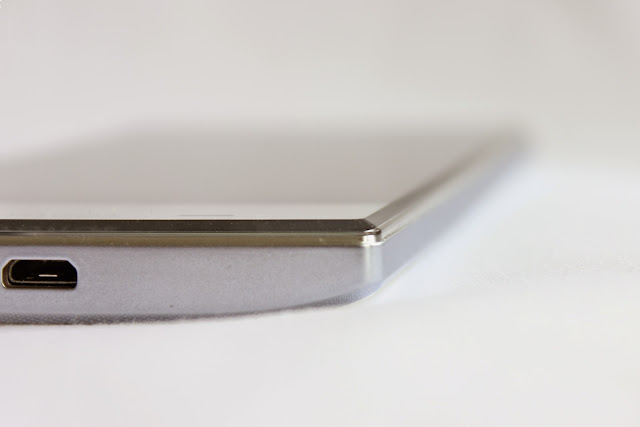
This design looks and feels very nice in the hand. The back is rounded and is made out of a dimpled hard-plastic material very similar in appearance to the Samsung Galaxy S5 that covers the non-removable battery, SIM card, and microSD card slot. This is a budget phone and the materials represent that - everything is some form of plastic. However, the faux-metal frame surrounding the device is quite convincing - a much better imitation than Samsung’s Galaxy S4 or S5.
Because the bezels are so thin, the Sharp AQUOS Crystal is smaller than any other devices I have used that have 5 inch displays. The actual size of the entire device is very similar to the first generation (2013) Moto G as the AQUOS Crystal adds just 0.05 inches to the height and width of the Moto G. The difference is that the Moto G has rounded corners and a smaller 4.5 inch display, and the AQUOS Crystal is rectangular with a 5 inch display.
In order to create this design, especially at this price point, Sharp had to make some significant deviations from typical smartphone design - some of them are beneficial while others are compromises that may be distracting to some users.
First, let’s talk about the beneficial or at least benign changes. These include the acrylic display and lack of an earpiece speaker. The acrylic display is chamfered around the edges to give it a softer feel and so your fingers easily slide on and off the edge of the device. If Sharp had decided to use this same design with a glass covering, I would be seriously concerned about it shattering the first time you dropped it. The display covering literally touches the edge of the phone all the way around, so unless the it landed perfectly on its back, a glass display would undoubtedly shatter when dropped. However, the acrylic material used should withstand drops much better than glass. The downside to this material is that it could be more prone to scratches.
Sharp uses direct sound wave transmission which essentially vibrates the entire display to create sound
Second, there is no earpiece speaker as the display goes all the way up to the top of the phone. To get around this issue, Sharp uses direct sound wave transmission which essentially vibrates the entire display to create sound. I was not expecting much, but Sharp delivers and executes this very well - you can put your ear anywhere on the display and hear good quality sound for voice calls. With your ear placed on the device, the volume is clear and loud enough for all but the noisiest environments.
Now on to the compromises. The display’s acrylic covering is chamfered at the edges to round them off before meeting the edge of the device. The problem is that the innermost portion of the chamfer begins over the top of the underlying LCD and can cause some distortion and refraction around the edges of the display. The distortion along the chamfered edges is from the chamfer itself, and would have occurred similarly with a glass display. I noticed this right away, but keep in mind it is a tiny sliver along the edges - when I handed the phone to most people they did not even notice it.

There is a slim region where refraction occurs along the chamfered edges.
Another issue with having narrow bezels is that the LCD backlight is visible at extreme angles in dark environments. It is not backlight bleed per se as the backlight does not bleed onto the display, it is just visible around the edge of the display because there is no bezel to cover it up. This is not a big deal to me, but if you use this phone in the dark you will likely notice it.
Lastly, because of the edge-to-edge design, the front facing camera is located in the “chin” or bottom bezel of the phone. When you use it, the camera software actually tells you to turn the phone “upside-down to take better self shots” which you should probably do to prevent the otherwise up-your-nose-angle selfies. More about the camera quality later.
Display
The display is a 5 inch 1280x720 (720p) LCD display. Although it is not the most pixel dense display at 294 pixels per inch (PPI), the LCD is a very good quality panel. Sharp is capable of making some great LCD panels and proves that again with the AQUOS Crystal display. The colors are vibrant yet accurate, it has excellent contrast with nice inky blacks and bright whites, and overall it is great looking display.
The acrylic display is clear and does not appear to adversely affect the display in any way
Compared side-by-side with higher resolution 1080p displays like the Galaxy S4 and Nexus 5 shown below, you can definitely see some pixels if you look closely, but at normal viewing lengths most people will not be able to see any pixelation. Text and graphics look sharp at normal viewing distances to me, even though the phones I use on a daily basis have much higher pixel densities. The acrylic display is clear and does not appear to adversely affect the display in any way.
Depending on the zoom level you are using to view the following images you may see a moire pattern - don't confuse that with pixelation - click on the images below to see them at full size.

Close-up of the AQUOS Crystal on the left vs. the Nexus 5 on the right.

Close-up of the Galaxy S4 on the left vs. the AQUOS Crystal on the right.
Cameras
The rear-facing camera is a 8 MP shooter and takes good pictures in ideal conditions. In less than ideal situations such as low light or a moving subject, the picture quality can degrade significantly. Pictures taken indoors may turn out blurry and with a lot of digital noise. In the gallery at the end of this section, notice how much noise is in the pictures of the desk and keyboard that I took in an intentionally poorly lit office. Essentially, it is an average quality camera for the cost but much worse than almost any iPhone or flagship Android device.
The front-facing camera is just 1.2 megapixels and does not have a wide enough field of view. To get anything besides a close-up of your face inside the frame you have to hold the device at arms-length. Even in well lit environments there is some digital noise, and in low light it gets much worse with lots of noise and very inaccurate colors. Overall, the front-facing camera quality is poor.
Sharp’s camera app is actually pretty good. There are many customization options in addition to automatic prompts for photographic guides such as the rule of thirds, Fibonacci spiral, golden ratio, and many more - even one specifically designed for taking pictures of food. Unfortunately, the shutter sound is turned on at high volume with no way to turn it down.
The AQUOS Crystal can also shoot 1080p video at 30 frames per second with continuous autofocus. Overall the video quality is decent considering the price of this phone.
Below are some unedited pictures taken with the Sharp AQUOS Crystal's camera.
Software & Unique Features
Thankfully the AQUOS Crystal is running a near stock version of the Android 4.4.2 KitKat operating system. There is almost no skinning of the user-interface and minimal bloatware. The carrier add-ons include Sprint’s Mobile ID, Connections Optimizer, and Voicemail apps, and something called Speaktoit Assistant which appears to be a Google Now clone.
Now that Android 5.0 Lollipop is about to be released, we can hope that Sharp will update the AQUOS Crystal, but there has been no official word from Sharp or Sprint at this time.
Sharp has added a few features that are essentially just built-in apps: Harman/Kardon Audio and Clip Now. Harmon/Kardon audio contains Clari-Fi which is supposed to enhance compressed audio and LiveStage which is apparently adds “dimension to the sound.” In reality these Harman/Kardon apps are just equalizers: Clari-Fi tends to accentuate the high-end making it sound “more detailed” and LiveStage tends to take anything that was in the center of the soundstage and move it peripherally. If you like what these equalizers do then that is great, but they are turned off by default for the rest of us. The Clip Now app allows you to take screenshots by swiping across the top of the display but I turned this off as I was constantly taking screenshots when just trying to swipe down on the notification tray.
There are some visualizations that Sharp has added to the device to highlight the edge-to-edge design. They do not really serve a purpose other than for Sharp to show off the AQUOS Crystal's tiny bezels.
Performance
The Sharp AQUOS Crystal uses the same Snapdragon 400 quad-core processor and Adreno 305 graphics that are in both the 2013 and 2014 Moto Gs. Compared to the Moto G it has 512 MB of additional RAM giving it a total of 1.5 GB. In typical daily use, the AQUOS Crystal responds quickly moving through the user-interface with minimal lag. You can introduce a little bit of lag in certain apps, for example if you are scrolling quickly on a graphically intense site in Chrome, but for the most part, apps open quickly and respond as you would expect on any modern Android device.
The Sharp AQUOS Crystal’s performance is nearly identical to the Moto G
Graphically intense games will run on this device, but frame rates are not as good as higher-end devices with better GPUs. Benchmarks are consistent with real-world use. As you can see in the graphs below the Sharp AQUOS Crystal’s performance is nearly identical to the Moto G.
The Sharp AQUOS Crystal was benchmarked with Geekbench 3, 3D Mark, and AnTuTu benchmark. All benchmarks measure a number of factors, but Geekbench is more focused on processor performance, 3D Mark is primarily measuring graphics performance, and AnTuTu is a combination of both. With all three benchmarks, higher scores are better.
Battery life is surprisingly good considering the battery capacity is on the low end at 2040 mAh. It should easily last all day even with moderate to heavy usage. Although this will vary greatly depending on what apps you have running in the background, standby time was also very good lasting multiple days with light usage.
The small speaker on the back of the device is mediocre and easy to block with your hand by accident. You will probably want to use headphones when listening to music or watching videos.
The wireless connectivity of the AQUOS Crystal is great - it includes support for all three LTE bands available on Sprint's network. That means that in supported regions this device should have a faster and more reliable data connection. In my testing LTE signal was typically strong and speeds were very good.
Conclusion
Although it has mid-range specifications, the Sharp AQUOS Crystal is a excellent buy for the money. For $150 or less you get a tri-band LTE device with an eye-catching design, a beautiful display, and plenty of expandable storage.
For $150 or less you get a tri-band LTE device with an eye-catching design, a beautiful display, and plenty of expandable storage
For these reasons, it easily beats other phones in its low-cost off-contract category, even the excellent Motorola Moto G. In this $150 and under category, these two phones are the only ones worth your consideration. If you are trying to decide between the Moto G and the Sharp AQUOS Crystal, simply ask yourself if the addition of higher data speeds and expandable storage is worth the cost difference to you.
If you found this review helpful, please let me know by sharing it or by clicking the 1+ button below. If you have any questions, please ask them in the comments section.