Latest Post :
Recent Post
Showing posts with label Amazon. Show all posts

Amazon's New Smartphone - The AT&T Exclusive Fire Phone

Amazon Fire Phone

Amazon unveiled a their first smartphone today - the Amazon Fire Phone starting at $200 with a 2-year contract with AT&T. Off-contract it is $650 for the 32GB base model and $750 for the 64GB model. The price includes 1 year of Amazon Prime at no extra cost for both new and current subscribers. You can pre-order now, but the phone will not be available until July 25.

I think that it is unfortunate that it is only available on AT&T when there are much better mobile phone providers out there.

The design of Amazon's phone is simple and understated, very similar to their Kindle products. It has a physical button on the side to access the camera and firefly apps.


Unique Features:
Firefly
Amazon's Firefly technology is essentially a way for you phone to recognize just about anything in your environment - text including phone numbers and email addresses, bar codes, and "70 million" products that can be discovered just by pointing the phone's camera at the object. It can also use the microphone to listen for music, movies, and TV shows and provide you information about them from sources like Amazon music and IMDB. It is pretty easy to see that Amazon created this feature as the ultimate price comparison app - you see or hear something around you and want to know how much it costs on Amazon - just hit the Firefly button, point your phone at the product and you can see the price on Amazon and buy it immediately.
Dynamic Perspective
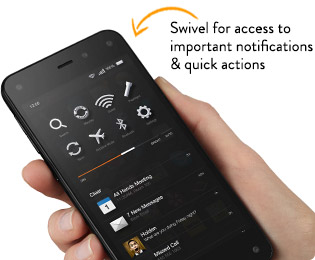
This feature was widely called "3D" in leaks prior to the event today, but its less 3D and more motion controlled actions (like opening up menus) and navigation such as scrolling through a web page or book simply by tilting the phone. There are some visual effects that can change the perspective of an image, map, or game just by moving the device. All of this is accomplished with motion sensors and 4 special front facing cameras that constantly track the position of your face.

The Main Camera
The Amazon Fire Phone has what looks like a pretty nice camera (we will see when it ships next month) with a 13 megapixel sensor, optical image stabilization, a wider lens than many smartphones at f/2.0 to let in more light, and an "intelligent HDR" system that lets you know when conditions are best for HDR mode.

Other Features
I am lumping these features together because they are already available on other Amazon Kindle products. They include, the live tech support or customer service called Mayday, the TV and movie information service powered by IMDB called X-ray, Amazon Music, Amazon Instant Video, Audible, and all the other Amazon services and features that are currently available on Kindle devices.

Fire Phone Specifications
Size5.5" x 2.6" x 0.35" (139.2mm x 66.5mm x 8.9mm)
Weight5.64 ounces (160 grams)
Processor2.2GHz Quad-core Snapdragon 800 CPU, with Adreno 330 GPU and 2GB of RAM
Display4.7" HD LCD display, with 1280 x 720 resolution at 315 ppi, 590 cd/m2 brightness (typical), 1000:1 contrast ratio (typical)
Cameras13 MP rear-facing camera, multi-frame HDR, auto focus, optical image stabilization, f/2.0 5-element wide aperture lens, LED flash
2.1 MP front-facing camera
OSFire OS 3.5.0
Storage32 GB or 64 GB
Cloud StorageFree cloud storage for all Amazon content, and photos taken with Fire phone
BatteryBattery size: 2400mAh. Talk time: up to 22 hours; standby time: up to 285 hours. Video playback: up to 11 hours; audio playback: up to 65 hours.
Video recording1080p HD video recording at 30 fps (front- and rear-facing cameras)
Audio playbackDual stereo speakers with Dolby Digital Plus audio processing
TV and VideoSupports screen mirroring and Second Screen
Content formats supportedAudio: Dolby Digital (AC-3), Dolby Digital Plus (E-AC-3), non-DRM AAC, MP3, MIDI, OGG, PCM/WAVE, AAC LC/ELD, HE-AAC (v1 & v2), AMR-NB, AMR-WB, AMR-WB+, Audible Enhanced format (AAX); Video: MPEG4, VP8, H.264/MPEG4/AVC,MPEG4 SP, H.263,AVI,HDCP2.x, PlayReady DRM; Images: JPG, GIF, PNG, BMP, GIF87a,GIF89a; Viewable docs: PDF, unprotected MOBI, PRC natively, DOC, DOCX, Kindle (AZW), KF8, TXT
SensorsDynamic Perspective sensor system with invisible infrared illumination, gyroscope, accelerometer, magnetometer, barometer, proximity sensor, ambient light sensor
LocationGPS, Assisted GPS, GLONASS, Wi-Fi/Cellular location, and Digital compass
CellularUMTS/HSPA+/DC-HSDPA (850, 900, 1700/2100, 1900, 2100 MHz), Quad-band GSM/EDGE (850, 900, 1800, 1900 MHz), 9 bands of LTE (Bands 1, 2, 3, 4, 5, 7, 8, 17, 20), supports carrier aggregation
Connectivity802.11a/b/g/n/ac Wi-Fi, up to 300 Mbps with channel bonding; Bluetooth 3.0 wireless technology; NFC enabled
HeadphonesPremium, tangle-free headphones with remote and mic
Rating for hearing aidsM4, T4
SIM CardPre-installed Nano SIM card
PortsMicro USB 2.0
3.5mm headphone
Warranty and Service1-year Limited Warranty included. Use of Fire phone is subject to these terms
Included in the BoxAmazon Fire Phone with Fire OS 3.5.0
Premium headphones with remote and mic
Micro USB to USB charging cable
USB power adapter (5W)
Quick Start Guide

Conclusion:
Amazon's first smartphone has decent mid-range specs and some interesting features, but I do not know if the motion controlled features and Amazon's services can can match all of the Android rivals out there, especially when you can get an unlocked Nexus 5 for nearly half the cost. I am an Amazon Prime customer, but to me $650 is too expensive for what you get. However, if you are already locked in to AT&T and are an Amazon Prime member (or want to try it out for a year) and plan to buy this phone, let me know what made you decide to purchase this over the competition.


Amazon's first smartphone.
My current rating: 2.5 out of 5 stars.

Amazon Unveils The $99 Amazon Fire TV Streaming Set-Top Box


Amazon Fire TV
Amazon announced the Fire TV today. Amazon started out the announcement by emphasizing three deficiencies in all of its competitor's products: search, performance, and the lack of an open ecosystem for apps and services. They used those problems to show how their Fire TV excels: it has easy to use voice-based search "that actually works," fast performance, and an open app and services ecosystem.

The Fire TV is a 4.5 x 4.5 inch box, less than an inch tall, and sports power, HDMI, optical audio out, Ethernet, and a USB ports on the back. The remote is small and simple with the obvious emphasis on voice search for everything but basic navigation.


The specs include a quad-core processor clocked at 1.7 GHz, 2 GB of RAM, an Adreno 320 GPU, and 8 GB of onboard storage. It supports Bluetooth 4.0, dual band wireless-N WiFi, and up to 7.1 channel Dolby Digital Plus sound. For video you get the standard 1080p HDMI out with up to 60 frames per second.

For movies and TV shows Amazon Fire TV supports Amazon's Prime Instant Video, Netflix, Hulu Plus, Youtube, Plex, and more. Unfortunately there is no HBO Go or Vudu at this point. The Fire TV also supports music streaming of anything you have purchased through AmazonMP3 music as well as Pandora, iHeartRadio, and TuneIn.

Amazon FireTV Game Controller
There are a number of other features including parental controls call "FreeTime," the ability to see Movie/TV/Actor information from IMDB either on the TV or your tablet called "X-ray," but the major differentiating factor is that the Fire TV doubles as a Android gaming console. You can buy a Amazon game controller that looks very similar to a Xbox controller. Amazon says they will have "1000s of games" in the coming months that are being ported over to the Fire TV and that they will be inexpensive - I expect these to be many of the popular Android games already out there. Amazon also has created its own game development studio and has some original gaming content available now - a new shooter called Sev Zero - plus more on the way. Note that this is not intended for console gamers - this is for people who like to play mobile games on their phones or tablets, providing a way to play those games on a bigger screen.

Overall, I like that Amazon has made a relatively powerful streaming device for a reasonable price, but I do not see a reason to upgrade right now if you have already have a Roku or Blu-ray player that handles streaming video relatively well. However, if you do not yet have a streaming device and plan to use Amazon Instant Video or Netflix, the Fire TV is a very attractive option. What do you all think? Do you plan to buy a Fire TV?

Refurbished Kindle Fire Review - An Excellent Tablet for the Price

 is an excellent tablet for the price. I purchased a refurbished Kindle Fire when it was the Gold Box deal of the day for $139 and have been very happy with it overall with a few small caveats.
Kindle Fire Review
Should you buy a refurbished Kindle Fire? I highly recommend it.  You get the same 1 year warranty as a new one, and I honestly could not tell that mine was refurbished.  When it arrived it was packaged as if it was new and there were no signs of use whatsoever - it looked brand new, and has worked perfectly ever since!
 Pros:
+ Inexpensive
+ Excellent, intuitive user interface
+ Nice high resolution IPS display
+ Performance - applications, media, and web browsing are fast
+ Tight integration with Amazon media services (video, music, books, etc.)
+ Minimalist design

Cons:
- Some applications in the Amazon App Store are not available for the Kindle Fire
- Besides music, Amazon Cloud Drive is not fully integrated into the OS
- No "advanced features" such as GPS, bluetooth, or wireless 3G (honestly, you can't really expect these at such a low price point)


Design:
The design is minimalist - the only thing on the front of the tablet is the display.  There is only 1 button (the power button) on the bottom of the tablet next to the micro-usb charging port.  There is a headphone jack on the other side of the micro-usb port.  There are two small speakers on the top of the device, but are barely noticeable as they are incorporated into the bezel. The back is made out of rubberized plastic which feels soft in your hands and is not slippery.

Hardware:
If you are reading this review you have probably already looked at the specifications - I won't rehash the processor speed, RAM, storage space, etc.  I will say that the processor and RAM are more than adequate for anything that I have done - applications load quickly and run well, videos and music play without any problems, and web browsing with the silk browser is fast.  I was worried that the 8Gb of storage (about 6Gb user available) on the device would not be enough, but since essentially everything but your applications is in the cloud, I have not even come close to maxing out the available storage.

User Interface:
I have plenty of experience with both Android and iOS devices. Before buying the Kindle Fire I was skeptical about the heavily modified android OS it uses. It turns out I was pleasantly surprised.  The "home screen" is much different than most android devices.  At the top there is a search bar and tabs for all of the Amazon services (newsstand, books, music, video, docs, apps, and web).  Underneath that is a carousel of recently used apps, and at the bottom are your favorites - these can be applications, specific web pages, books - pretty much anything you use often and want to put there. This works well as the web, applications, and all Amazon services are just one touch away.  The only downside to this is that there are no widgets unlike other android devices.  However, if you really like the typical Android OS home screen with widgets, you can install (via "side loading") a launcher (for example ADW.launcher EX is known to work well) that will create the typical home screen and allow widgets.

Amazon Products & Services:
The Kindle Fire OS was clearly designed to be integrated with all of Amazon's digital content. Any books, magazines, music, videos, or applications that you have purchased are available to you from the cloud and synced or streamed to your device seamlessly.  The built in applications for reading books or magazines, listening to music, and watching video work very well and are easy to use.

If you have an Amazon Prime account there are thousands of TV shows and movies to watch for free and books that you can borrow for free each month.  Any music you have bought from the Amazon's MP3 music store will appear on your device automatically. Any music you have bought through other services can be uploaded to your Cloud Drive and will then be playable from the Kindle Fire.  You get 5Gb of free storage space (the things you buy from Amazon do not count towards your 5Gb limit).  You can pay to get a larger cloud drive if necessary (20Gb is only $20/year) - if you go to any paid version of the cloud drive you get unlimited music storage (i.e. none of your music counts against your storage limit).

One thing that I was disappointed with is that non-music files in your cloud drive are not easily accessible.  Unlike music, which shows up immediately under the music tab in the OS, documents, pictures, videos, etc.that you have uploaded are not accessible except through the browser - no different than on your PC. I don't understand why the rest of the cloud drive is not integrated into the OS - perhaps it will be at some point, all it would take is a software update. There is a way to send documents via email to your Kindle Fire or through a new application that can be installed on your computer, for your Mac, or Windows.

Applications:
Since the Amazon App Store was launched it has come a long way in catching up to the apps available in the Google Play market.  Now, almost all of the major apps are available in both locations.  The Kindle Fire's built in web browser and email application work quite well.  I enjoy the "reading view" mode in the browser - it reformats the website's text into a kindle like format for easier reading without all of the extraneous sidebars, ads, etc. Unfortunately there is no built in calender application, although you can buy 3rd party applications, such as CalenGoo, that will work.

One of the most disappointing things I have come across using the Kindle Fire is that even though most applications are available in the Amazon App Store, some of them are not available for the Kindle Fire. For example some of the apps I use: Dropbox, Business Calendar, WeatherBug Elite, and FlightTrack are not currently supported by the Kindle Fire.  I assume this may be due to the fact that the Kindle Fire does not have some of the services built into the stock Android OS such as location or Google calender services, but I am not sure.  Some apps, such as Dropbox, are not supported by the Amazon App store for the Kindle Fire but actually work fine if they are "side loaded" but others will crash or not install if you attempt to install them outside of the Amazon App Store.  I imagine as time goes on this will improve as more app developers create Kindle Fire versions of their apps.

Summary:
If you already have an Amazon Prime membership or plan to get one, you cannot go wrong with the Kindle Fire.  It is an excellent, fast, well designed tablet for using Amazon services.  Most major Android apps are available and work great, but some applications are not supported by the Kindle Fire even though they are available to other devices in the Amazon App Store.
Review Summary:
Item reviewed: Kindle Fire
Overall rating: 4 out of 5 stars.
Published: 06/02/2012


Support : Creating Website | Johny Template | Mas Template
Copyright © 2011. Technology Share - All Rights Reserved
Template Created by Creating Website Published by Mas Template
Proudly powered by Blogger