Latest Post :
Recent Post
Showing posts with label Reviews. Show all posts

Sharp AQUOS Crystal Review


Overview

The is a unique new phone offered exclusively on Sprint, Boost, and Virgin Mobile. It can also be activated on Ting. The near bezel-less design is the most striking thing about this device and to accomplish that Sharp has made some bold design choices: it has tiny bezels, no headset speaker, the front-facing camera is at the bottom of the device, and its screen is made of acrylic instead of glass.

For those of us in the United States, we do not often think of Sharp as phone manufacturer because their devices rarely make it here. However, Sharp is a Japanese electronics company that has been selling smartphones that are popular in Japan for quite some time. This new offering by Sprint in the US likely has much to do with Sprint’s new Japanese owner, Softbank, which has close ties with Sharp in Japan.

Before we go any further, we need to talk about the price. Off-contract the Sharp AQUOS Crystal is $240 from Sprint and only $150 from Boost and Virgin Mobile. It can be found at retailers such as Amazon and Best Buy for even less. That very low price will influence the way we look at and talk about this phone - it is not a flagship device and shouldn’t be judged by the same criteria as devices that cost much, much more. This review unit is the Boost Mobile variant, but my observations can be applied to the other variants as the differences are only in the back color and packaging.

Pros & Cons

Pros
  • Unique nearly bezel-less design
  • Excellent display quality
  • Very compact for a device with a 5” display
  • Expandable storage up to 128 GB with a microSD card
  • Good battery life
  • Low price of just $150 off-contract
Cons
  • Entire phone is made of plastic materials
  • Distortion/refraction from chamfered display edges
  • Backlight visible at certain angles
  • Only available on Sprint networks

Below are my review ratings. Overall the Sharp AQUOS Crystal receives 4.1 out of 5 stars.

Value = 5
Hardware = 3.5
Design = 4.5
Display = 4.5
Cameras = 3
Software & Features = 4.5
Performance = 4

Hardware & Design

The most striking aspect of this device is what is not present - the top and sides of the AQUOS Crystal are nearly bezel-less. The bottom bezel can appear somewhat prominent because of this in pictures, but it is not as noticeable in person. To put it in perspective, the bottom bezel is the same height as the bottom bezel of an iPhone 5s.

Sharp AQUOS Crystal and iPhone 5s
The bottom bezels of an iPhone 5s on the left next to the Sharp AQUOS Crystal on the right.

This design looks and feels very nice in the hand. The back is rounded and is made out of a dimpled hard-plastic material very similar in appearance to the Samsung Galaxy S5 that covers the non-removable battery, SIM card, and microSD card slot. This is a budget phone and the materials represent that - everything is some form of plastic. However, the faux-metal frame surrounding the device is quite convincing - a much better imitation than Samsung’s Galaxy S4 or S5.

Because the bezels are so thin, the Sharp AQUOS Crystal is smaller than any other devices I have used that have 5 inch displays. The actual size of the entire device is very similar to the first generation (2013) Moto G as the AQUOS Crystal adds just 0.05 inches to the height and width of the Moto G. The difference is that the Moto G has rounded corners and a smaller 4.5 inch display, and the AQUOS Crystal is rectangular with a 5 inch display.

In order to create this design, especially at this price point, Sharp had to make some significant deviations from typical smartphone design - some of them are beneficial while others are compromises that may be distracting to some users.

First, let’s talk about the beneficial or at least benign changes. These include the acrylic display and lack of an earpiece speaker. The acrylic display is chamfered around the edges to give it a softer feel and so your fingers easily slide on and off the edge of the device. If Sharp had decided to use this same design with a glass covering, I would be seriously concerned about it shattering the first time you dropped it. The display covering literally touches the edge of the phone all the way around, so unless the it landed perfectly on its back, a glass display would undoubtedly shatter when dropped. However, the acrylic material used should withstand drops much better than glass. The downside to this material is that it could be more prone to scratches.
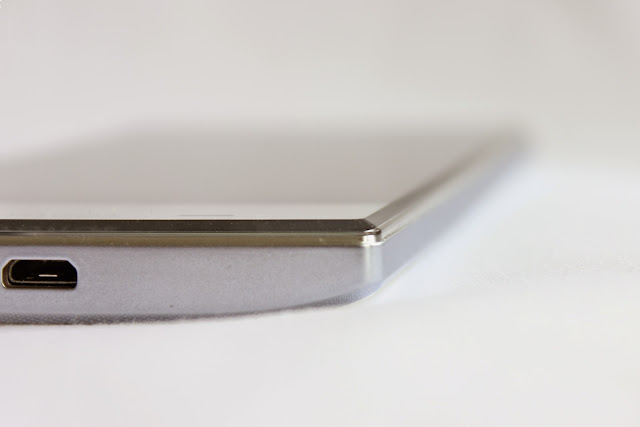
Sharp AQUOS Crystal chamfered display
Sharp uses direct sound wave transmission which essentially vibrates the entire display to create sound

Second, there is no earpiece speaker as the display goes all the way up to the top of the phone. To get around this issue, Sharp uses direct sound wave transmission which essentially vibrates the entire display to create sound. I was not expecting much, but Sharp delivers and executes this very well - you can put your ear anywhere on the display and hear good quality sound for voice calls. With your ear placed on the device, the volume is clear and loud enough for all but the noisiest environments.

Now on to the compromises. The display’s acrylic covering is chamfered at the edges to round them off before meeting the edge of the device. The problem is that the innermost portion of the chamfer begins over the top of the underlying LCD and can cause some distortion and refraction around the edges of the display. The distortion along the chamfered edges is from the chamfer itself, and would have occurred similarly with a glass display. I noticed this right away, but keep in mind it is a tiny sliver along the edges - when I handed the phone to most people they did not even notice it.

AQUOS Crystal distortion/refraction
There is a slim region where refraction occurs along the chamfered edges.

Another issue with having narrow bezels is that the LCD backlight is visible at extreme angles in dark environments. It is not backlight bleed per se as the backlight does not bleed onto the display, it is just visible around the edge of the display because there is no bezel to cover it up. This is not a big deal to me, but if you use this phone in the dark you will likely notice it.

front-facing camera warning

Lastly, because of the edge-to-edge design, the front facing camera is located in the “chin” or bottom bezel of the phone. When you use it, the camera software actually tells you to turn the phone “upside-down to take better self shots” which you should probably do to prevent the otherwise up-your-nose-angle selfies. More about the camera quality later.

Display

The display is a 5 inch 1280x720 (720p) LCD display. Although it is not the most pixel dense display at 294 pixels per inch (PPI), the LCD is a very good quality panel. Sharp is capable of making some great LCD panels and proves that again with the AQUOS Crystal display. The colors are vibrant yet accurate, it has excellent contrast with nice inky blacks and bright whites, and overall it is great looking display.

The acrylic display is clear and does not appear to adversely affect the display in any way

Compared side-by-side with higher resolution 1080p displays like the Galaxy S4 and Nexus 5 shown below, you can definitely see some pixels if you look closely, but at normal viewing lengths most people will not be able to see any pixelation. Text and graphics look sharp at normal viewing distances to me, even though the phones I use on a daily basis have much higher pixel densities. The acrylic display is clear and does not appear to adversely affect the display in any way.

Depending on the zoom level you are using to view the following images you may see a moire pattern - don't confuse that with pixelation - click on the images below to see them at full size.

close-up nexus 5 vs sharp aquos crystal
Close-up of the AQUOS Crystal on the left vs. the Nexus 5 on the right.

close-up galaxy s4 vs sharp aquos crystal
Close-up of the Galaxy S4 on the left vs. the AQUOS Crystal on the right.

Cameras

The rear-facing camera is a 8 MP shooter and takes good pictures in ideal conditions. In less than ideal situations such as low light or a moving subject, the picture quality can degrade significantly. Pictures taken indoors may turn out blurry and with a lot of digital noise. In the gallery at the end of this section, notice how much noise is in the pictures of the desk and keyboard that I took in an intentionally poorly lit office. Essentially, it is an average quality camera for the cost but much worse than almost any iPhone or flagship Android device.

sharp aquos crystal taking a picture

The front-facing camera is just 1.2 megapixels and does not have a wide enough field of view. To get anything besides a close-up of your face inside the frame you have to hold the device at arms-length. Even in well lit environments there is some digital noise, and in low light it gets much worse with lots of noise and very inaccurate colors. Overall, the front-facing camera quality is poor.

Sharp’s camera app is actually pretty good. There are many customization options in addition to automatic prompts for photographic guides such as the rule of thirds, Fibonacci spiral, golden ratio, and many more - even one specifically designed for taking pictures of food. Unfortunately, the shutter sound is turned on at high volume with no way to turn it down.

The AQUOS Crystal can also shoot 1080p video at 30 frames per second with continuous autofocus. Overall the video quality is decent considering the price of this phone.

Below are some unedited pictures taken with the Sharp AQUOS Crystal's camera.


Software & Unique Features

Thankfully the AQUOS Crystal is running a near stock version of the Android 4.4.2 KitKat operating system. There is almost no skinning of the user-interface and minimal bloatware. The carrier add-ons include Sprint’s Mobile ID, Connections Optimizer, and Voicemail apps, and something called Speaktoit Assistant which appears to be a Google Now clone.

Now that Android 5.0 Lollipop is about to be released, we can hope that Sharp will update the AQUOS Crystal, but there has been no official word from Sharp or Sprint at this time.

Sharp has added a few features that are essentially just built-in apps: Harman/Kardon Audio and Clip Now. Harmon/Kardon audio contains Clari-Fi which is supposed to enhance compressed audio and LiveStage which is apparently adds “dimension to the sound.” In reality these Harman/Kardon apps are just equalizers: Clari-Fi tends to accentuate the high-end making it sound “more detailed” and LiveStage tends to take anything that was in the center of the soundstage and move it peripherally. If you like what these equalizers do then that is great, but they are turned off by default for the rest of us. The Clip Now app allows you to take screenshots by swiping across the top of the display but I turned this off as I was constantly taking screenshots when just trying to swipe down on the notification tray.

There are some visualizations that Sharp has added to the device to highlight the edge-to-edge design. They do not really serve a purpose other than for Sharp to show off the AQUOS Crystal's tiny bezels.

harmon/kardon audio and frameless effects

Performance

The Sharp AQUOS Crystal uses the same Snapdragon 400 quad-core processor and Adreno 305 graphics that are in both the 2013 and 2014 Moto Gs. Compared to the Moto G it has 512 MB of additional RAM giving it a total of 1.5 GB. In typical daily use, the AQUOS Crystal responds quickly moving through the user-interface with minimal lag. You can introduce a little bit of lag in certain apps, for example if you are scrolling quickly on a graphically intense site in Chrome, but for the most part, apps open quickly and respond as you would expect on any modern Android device.

The Sharp AQUOS Crystal’s performance is nearly identical to the Moto G

Graphically intense games will run on this device, but frame rates are not as good as higher-end devices with better GPUs. Benchmarks are consistent with real-world use. As you can see in the graphs below the Sharp AQUOS Crystal’s performance is nearly identical to the Moto G.

The Sharp AQUOS Crystal was benchmarked with Geekbench 3, 3D Mark, and AnTuTu benchmark. All benchmarks measure a number of factors, but Geekbench is more focused on processor performance, 3D Mark is primarily measuring graphics performance, and AnTuTu is a combination of both. With all three benchmarks, higher scores are better.

Battery life is surprisingly good considering the battery capacity is on the low end at 2040 mAh. It should easily last all day even with moderate to heavy usage. Although this will vary greatly depending on what apps you have running in the background, standby time was also very good lasting multiple days with light usage.

The small speaker on the back of the device is mediocre and easy to block with your hand by accident. You will probably want to use headphones when listening to music or watching videos.

The wireless connectivity of the AQUOS Crystal is great - it includes support for all three LTE bands available on Sprint's network. That means that in supported regions this device should have a faster and more reliable data connection. In my testing LTE signal was typically strong and speeds were very good.

Conclusion

Although it has mid-range specifications, the Sharp AQUOS Crystal is a excellent buy for the money. For $150 or less you get a tri-band LTE device with an eye-catching design, a beautiful display, and plenty of expandable storage.

For $150 or less you get a tri-band LTE device with an eye-catching design, a beautiful display, and plenty of expandable storage

For these reasons, it easily beats other phones in its low-cost off-contract category, even the excellent Motorola Moto G. In this $150 and under category, these two phones are the only ones worth your consideration. If you are trying to decide between the Moto G and the Sharp AQUOS Crystal, simply ask yourself if the addition of higher data speeds and expandable storage is worth the cost difference to you.

If you found this review helpful, please let me know by sharing it or by clicking the 1+ button below. If you have any questions, please ask them in the comments section.

Review Summary:
Item reviewed: Sharp AQUOS Crystal
Summary: For those using Sprint's networks who do not want to spend much on a new device, the Sharp AQUOS Crystal performs well and is a great value.
Overall rating: 4.1 out of 5 stars.
Published: 11/04/2014

Ting Review Update and Cost Comparison For 2014

Overview

has a totally different approach to wireless service compared to other mobile carriers: instead of charging you a set amount each month for a "plan" they simply have tiered rates for different services. Ting charges you for what you actually use in three separate categories: minutes, texts, and data - everything else is free.

Have you already read the review and are back for the $25 ting credit? If so, use this link immediately prior to buying your first Ting phone or activating your first line through the BYOD process.

Ting Mobile That Makes Sense

Pros & Cons

Pros
  • No contract
  • Cost varies according to usage (in tiers)
  • Additional lines only cost $6
  • Free tethering & hotspots
  • Free alerts and per-line limits
  • Excellent customer service
  • No hidden/extra fees
  • Early termination fee relief
Cons
  • Phones are not subsidized so they are little more expensive
  • If you are not in an area with 4G LTE, Sprint 3G may be slow
  • No current generation iPhone support (only the 4 through 5s models are available)

For the full review and ratings continue reading below. You may also skip to the updated section at the end that includes pricing charts comparing Ting to T-mobile, Sprint, AT&T, and Verizon using real usage data.


Below are my review ratings. Overall Ting receives a very good 4.3 out of 5 star rating.


Value = 5
Customer service = 5
Coverage = 4.5
Phone selection = 4
Network Speed = 3


Finding a New, Less Expensive Carrier

At the beginning of 2013 I was doing a lot of research trying to find a new cell phone provider as my monthly bills just kept getting more and more expensive even though my usage had actually decreased. Initially I was planning on switching from T-mobile to another GSM carrier - this time a no-contract one - just because it is so easy to switch providers and keep your unlocked phone. But, I was trying to find the best option for us and I came across a company I had never heard of before, called Ting, a Sprint MVNO (mobile virtual network operator) owned by Tucows.
The two most important factors to consider in choosing a wireless provider are coverage and value."

In my opinion the two most important factors to consider in choosing a wireless provider are coverage and value. Consequently, before even reading the rest of this review you should determine if Ting has good coverage in your area and if Ting offers good value for your specific needs.

Coverage and Network Speed

Ting uses Sprint's wireless network to provide service that includes a voice-only roaming deal with Verizon.  That means that if you already have Sprint and are satisfied with the coverage in your area, switching to Ting should make no difference. If you are switching from another mobile provider, check Ting's coverage map to see what coverage is like in your area. We would also highly recommend asking friends, family, or co-workers who use Sprint about their coverage. If you can find someone who will loan you their old deactivated Sprint phone you should take it with you to work, home, and the other places you frequent to determine what the signal strength is like in those important areas.  Sprint is in the middle of a nationwide improvement of their wireless infrastructure they are calling "Network Vision." This is a good thing, as areas that have been upgraded can provide significantly better coverage, voice call quality, and network speeds. Although a large number of 4G LTE sites have come online in the last year, unfortunately not everywhere is covered yet, and those sites that have not been upgraded can be incredibly slow. If you plan to use a smartphone and having a fast data connection is important to you, then you are probably going to want make sure your area has 4G LTE. For more objective data on Ting's network, check the RootMetrics coverage map and choose "Sprint" as the carrier. It is a great way to check the fastest and average data speeds in your area.

Value: Is Ting Worth it for You?

On average we are saving 60% every month compared to our previous cell phone provider.
Ting will most likely save you money unless you need to use a lot of data. Grab your last couple of mobile phone bills and head over to the savings calculator to see your projected monthly bill. They use your current usage in minutes, texts, and data to estimate how much you will save and in my experience it is accurate.

Before signing up, I compared Ting to many of the other no-contract providers such as T-mobile's no-contract service, Tracfone, AT&T's GoPhone, Boost, and Virgin mobile. Besides Ting, they all had a few things in common - you either had to sign up for a very low allowance plan, they did not have good smartphones, or you had to spend at least $40-50 per line per month for an "unlimited" plan that wasn't actually unlimited. After running all the numbers, for us, Ting was the best value. Everyone has a unique situation, but on average we are saving 60% every month compared to our previous cell phone provider. That savings is incredible considering that before we only had 2 out of 5 lines with a data allowance and now we have added an extra line so we have 6 smartphones on my account.

As an incentive to switch, Ting also offers a credit equal to 25% of any early termination fees (ETFs) you paid in order to switch from another carrier. Also, if you have a phone on another carrier like Verizon, AT&T, or T-mobile, and want to switch to Ting, you can sell your current device on Glyde and Ting will give you a credit for 30% of the device's selling price through their improved swap program:

Swap your AT&T, Verizon or T-Mobile device for one that's Ting-ready. Whatever you sell your phone for, we'll top you up with an additional 30% in Ting credit to off-set the cost of your new phone.

You may be wondering, "but why is Ting so cheap?" Is there something lacking in Ting's service? From my experience there is very little to complain about. Ting answered the "why are you so cheap" question in a blog post that is an interesting read if you have time, but the bottom line is that Ting isn't that "cheap" - you pay for what you use, Ting earns a healthy margin, and that is it. The reason Ting seems cheap is because the wireless industry as a whole in the US is very expensive: prices are inflated and almost every carrier makes you buy far more usage (minutes, texts, data) through their plans than you will ever use.

Ting Charges According to Actual Usage

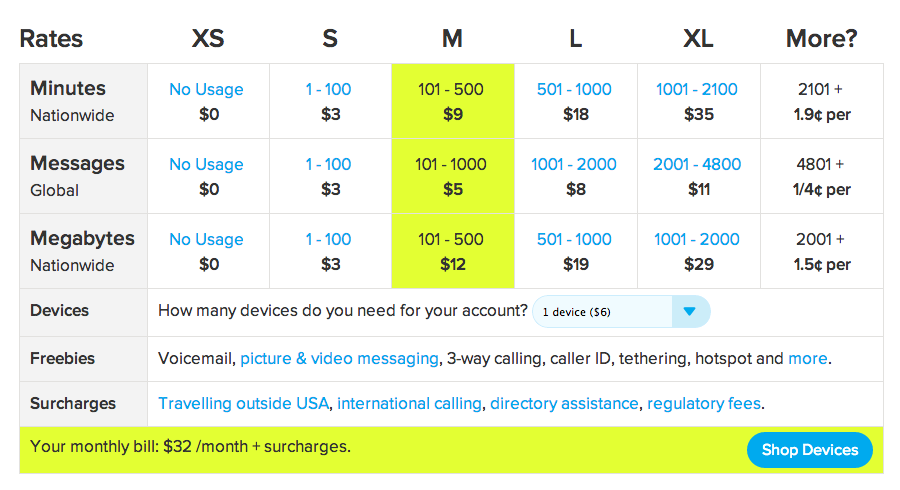
What first attracted me to Ting is that they charge you according to your actual usage without any contract. At the end of the billing cycle Ting will charge you according to your usage in the tiers listed below in 3 separate categories: minutes, texts, and data. There are no plans or overages - you just pay for what you use.

Also, knowing that we can save money by limiting our usage helps us be more aware of our usage and more likely to do things like connect to WiFi when it is available or use Google Voice on a computer if we need to make an extended call. Those things help us limit our data and minutes usage and are easy to do.

Rates and Tiers

Here is a diagram of the rates Ting offers. Remember you start out at XS (zero minutes, texts, and data) and the plan will adapt according to your usage. Each line costs $6 per month to continue service. In the example below using up to 500 minutes, 1000 texts, and 500 megabytes of data for one device would cost roughly $32 per month. These are new, lower, rates as of February 2014 that benefit everyone, especially heavy data users.
Ting review 2014 rates

Your Bill, Free Alerts, and Per-Line Limits

The Ting dashboard and subsequent bill are very intuitive and easy to use. Watch the video below to get a quick idea of what the Dashboard is all about. The dashboard makes it easy to keep track of your usage throughout each month.

Ting also includes usage alerts and individual line limits for free. Most other carriers I have used charge extra for those features and call them "parental controls" or something similar. If you have a family and your teenager is texting or using up data like crazy you can automatically warn them to slow down, and then if they do not heed the warning, cut them off until the end of the billing period - they will learn pretty quickly to stay within the limits you have provided ;-)

Ting also offers dashboard apps for both Android and iOS to track your usage and change settings directly from your phone.

Phones and Tablets

Ting offers some very nice high-end Android phones like the HTC One M8, Samsung Galaxy S5, Galaxy Note 3, Motorola Moto X, and more. You can even buy an unlocked Nexus 5 from the Google Play Store and bring it to Ting. The Apple iPhone 4, 4s, 5, and 5s can also be brought over to Ting but are not sold directly by Ting at this time. If you are interested in getting an iPhone on Ting, but are not sure where to start, check out this post on how to buy and activate the iPhone 5s (the same principles apply for other older models). Although not officially supported, the inexpensive but impressive Motorola Moto G can be activated.

For LTE equipped tablets, the 4th generation iPad (model A1460) and the first generation iPad Mini (model A1455) can be activated.

Most MVNOs do not get new devices nearly as fast as their respective carrier, but Ting has managed to offer new phones like the LG G2, Samsung Galaxy S5, HTC One, and the Motorola Moto X just a few days to weeks after Sprint has offered them. This indicates good relationships with Sprint as well as phone suppliers to make this happen. Also, Ting is the only Sprint MVNO that can activate the unlocked Nexus 5 and utilize Sprint's tri-band LTE, also known as Sprint Spark.

Ting has a bring your own device (BYOD) program where you can activate almost any new or used Sprint device. I took advantage of this when I first signed up and bought an inexpensive Smartphone from eBay to try everything out before deciding to switch the the rest of our lines over. If you don't mind buying a used phone, this is a great way to get a nice smartphone for much less than retail value. Check out CNET's 5 reasons to bring your smartphone to Ting if you are still wondering if switching would be best for you.

Customer Service

When I signed up for Ting I read about their "no hold" phone policy, but was skeptical to say the least. However, in the process of signing up I had a question, so I called their main phone number and to my surprise and delight an actual human answered almost immediately! No automated system to attempt navigate whatsoever and no holding! Since then we have called a number of times and everyone we have spoken to was knowledgeable and were able to answer our questions and resolve any issues right away.

Ting now offers a service that will help you find a used phone that is compatible with their network by asking you a few questions about what kind of phone you want and then searching Glyde, eBay, Amazon, and other places before giving you a list of possible options.

Potential Downsides

  • There is no "unlimited plan", so users who use a huge amount of minutes, texts, and data - this might not be the best for you.
  • The phones are not subsidized like other carriers (that lock you in to a 2 year contract) so they are kind of expensive up front.

Referral Program

Ting has a referral program where each person you refer gets a $25 credit towards service or a new device and the person who referred them also gets a $25 service credit.

If this post helped you decide to switch to Ting please use my referral link. After using the referral link you will get $25 off a device or a $25 credit to your account.

Review Updates for 2014

We switched to Ting at the beginning of 2013. I have edited my entire review to keep it up to date, but for this review update, I wanted to make sure that my recommendation of Ting's mobile services was still valid - after all, there have been some significant changes in the telecom industry recently. T-mobile has rebranded itself as an "un-carrier," doing away with contracts and lowering prices. Sprint, AT&T, and Verizon now all have the option of unsubsidized plans that are less expensive than their subsidized counterparts.
We are still saving a lot of money on Ting, and can continue to strongly recommend their mobile service.

So, I decided to see what the cheapest plans available from T-mobile, Sprint, AT&T, and Verizon would have charged for our first six months of usage in 2014 compared that to what we were actually charged by Ting. I used the Wall Street Journal calculator in addition to the carriers' websites to determine the projected costs. Since I chose the cheapest Big 4 plans that fit my actual usage for each month individually, I probably underestimated the costs as this would be the real-world equivalent of switching your plan every single month.

As you can see, even with heavy data usage in January (over 5 GB), Ting was still cheaper than all the other carriers by a small margin. With low data usage, Ting was often about half the cost of its closest competitor. After reviewing this new data, I am confident that we are still saving a lot of money on Ting, and can continue to strongly recommend their mobile service. Mouse over the interactive charts to see the actual costs and usage numbers.


If you found this review helpful, please let me know by sharing it or by clicking the 1+ button below. If you have any questions, please ask them in the comments section.
Review Summary:
Service reviewed: Ting
Description: Ting gets high marks on almost every category, including outstanding customer service. Ting's only real downsides come from their use of Sprint's network.
Overall rating: 4.3 out of 5 stars.
Updated: 09/30/2014

Tresorit Review - Dropbox-like Functionality with Better Security

Overview

is another cloud storage provider similar to Dropbox, SpiderOak, Google Drive, or Box. Much like SpiderOak, Tresorit seems to value security and privacy above all else. However, unlike SpiderOak, whose user-interface can feel old and unintuitive, Tresorit does a good job keeping the design and user-interactions simple and modern.

Tresorit is free for up to 5GB with the option of gaining up to 16GB for free through referrals. The paid options start at 20GB for $8 per month.

Tresorit Review

Pros & Cons

Pros
  • Apps available for all major platforms
  • Minimalistic design
  • Easy to create tresors
  • Excellent security
Cons
  • No context menu on Mac
  • Sharing files increases security risk

Below are my review ratings. Overall Tresorit receives a very good 4.5 out of 5 star rating.


Design = 4.5
Usability = 4.5
Security = 5
Performance = 4


When first installing Tresorit, you are greeted by this quick introduction demonstrating how Tresorit works. I have taken screenshots of the introduction and put them in a image gallery below:
    Tresorit Intro 1 Tresorit Intro 2 Tresorit Intro 3 Tresorit Intro 4
“Tresor” is the German word for “safe” or “vault.”

Design and Usability

The design of the Tresorit application is clean and modern. After logging in for the first time there is a window that shows all your “tresors” and their sync status. From this window you can turn syncing on/off, begin sharing a folder, and view recent activity for that folder such as when it has been accessed, synced, or edited. In case you are wondering, “tresor” is the German word for “safe” or “vault.”

To add a new tresor you simply click on the + button to create a new synced folder (a "tresor") or drag any file or folder into the main Tresorit window. On a Windows PC you can also add files or folders to be backed up and synced by simply right-clicking on the item and using the context menu. Unfortunately this feature is not available on the Mac app - to add items you have to drag them into the Tresorit app. Update: the beta version of Tresorit 2.0 for Mac does have a context menu similar to the Windows version. If you prefer an experience more like Dropbox, you can easily create a single folder and then move anything you want backed up and synced into that primary Tresorit folder.

Security

Security is Tresorit’s most important feature and it is heavily marketed. They even held a contest for hackers to break their client-side encryption for a bounty of $50,000 which has not been claimed. Like SpiderOak, Tresorit does the encryption on your device prior to anything being uploaded. That means they do not have your password or encryption keys and therefore cannot read your data. Even if a hacker was able to access their servers they would have to decrypt the data before it was readable and to do that they would have to brute-force break each individual’s encryption keys. On the other hand, it also means that they do not know your password and it cannot be recovered if you forget it - if you cannot remember your password your data that is stored in the cloud will essentially be lost.

Tresort uses AES 256 in addition to a proprietary encryption algorithm on top of that. How does this compare to SpiderOak? I did a brief review of SpiderOak some time ago and at that time they were definitely the most secure cloud storage provider. SpiderOak is probably nearly as secure as Tresorit, but one issue bought up by the heartbleed fiasco is SpiderOak's option of viewing and downloading files from the cloud using a standard web interface. As we all know after heartbleed, standard web interface cryptographic methods can be exploited. To give SpiderOak credit, you do not have to sign in using their web interface and they encourage you not to, but if you do, you are viewing those documents in a much less secure fashion. It is possible to login to Tresorit on the web via the installed app, to view your account information, but no files or folders are visible.

Sharing your files is an option in both SpiderOak and Tresorit and is likely fairly secure. However, an academic paper from Johns Hopkins University earlier this year looked at the various “zero-knowledge” cloud storage providers like Tresorit and SpiderOak and found that they could all technically decrypt shared data if they wanted to because they are acting as the certificate authority in addition to hosting the data. The obvious solution to this is, do not share anything unless you do not mind others seeing it!

However, both SpiderOak and Tresorit have said that the Johns Hopkins paper is flawed. SpiderOak publicly challenged the paper on their blog, and Tresorit has told me that they also found some issues with the authors' methodology and conclusions. I was able to ask the Tresorit cryptography team their thoughts regarding the John Hopkins' study. They confirmed that theoretically “the overall conclusion of the report is valid - there is a certain degree of trust that collaborating with Tresorit requires.” However, they suggested that “the scope of the trust and potential vulnerabilities are much less significant than the report makes them out to be because the researchers misunderstood some of the workings of the service based on their analysis of our code.”

The researchers hypothesize that Tresorit has a way of gaining access to your stored (and encrypted) data through the threat model they propose. However, the model only works for data that is actually in the process of being shared with someone else. Tresorit technologically has NO way of accessing the private key that is used to encrypt everything you store and sync with the service.

The attack model would only be possible if Tresorit was acting maliciously, or had been breached, and even then, would only be limited to a certain, targeted user, not all Tresorit users. Assuming that happened, the attacker would only have access to any data that the user shared AFTER the breach occurred. The user’s, unshared, private data uploaded before or after the breach would still be secure.

The alternatives they propose don't remove this modicum of trust from the operation, they just shift the trust from the cloud provider to a certificate authority. Unfortunately, certificate authorities are high-profile targets for attackers, as they are crucial for internet trust and security. This is part of the reason why we decided that Tresorit can only ultimately trust itself, and designed our privacy protecting sharing accordingly.

Performance

In my testing Tresorit has performed well. There is no noticeable lag between adding folders or documents and them getting uploaded and synced to my other devices. Upload speeds seem to be essentially capped at my ISPs upload limit. Syncing large files to other computers was fairly fast, but was not limited by my ISPs download cap.

Conclusion

Tresorit is an excellent backup and syncing tool for those who are concerned with security and privacy. If you need to store important personal or business documents in the cloud, Tresorit is probably one of the best option right now.

If you found this review helpful, please let me know by sharing it or by clicking the 1+ button below. If you have any questions, please ask them in the comments section below.

Review Summary:
Item reviewed: Tresorit
Description: A secure cloud storage solution that is easy to use.
Overall rating: 4.5 out of 5 stars.
Published: 07/14/2014

Copy.com Review - Generous Free Storage with 5GB for Every Referral


Update 5/15/13: In response to Google increasing Drive's capacity to 15GB, Copy has decided to match that and is giving away 15GB for free now instead of the initial 5GB. That means if you use a referral link, you get a sizable 20GB of free storage just for signing up. After you sign up, Copy will eventually offer to give you another 2GB for tweeting about their service as well. That means you can get 22GB without even referring anyone! Enjoy!


is a new cloud storage service similar to Dropbox, Google Drive, Box, Tresorit, or SpiderOak. It is a pretty crowded market but Copy is entering it anyway. So what makes Copy stand out compared to the host of other cloud storage services available?

From a user interface standpoint Copy.com is VERY similar to Dropbox. This is good because, as you probably already know, Dropbox is very simple and easy to use - it just works. Copy, like Dropbox has a single folder where you can add anything you want uploaded to the cloud and synced to your other devices. There are controls that allow you to pick which files/folders you want synced to which computer or device.

One thing that Copy is doing better than Dropbox right now is giving a way a huge amount of storage for free compared to Dropbox's somewhat miserly 2GB. I contacted Copy regarding their security and encryption policies because I was unsure about a couple things after reading their privacy policy and terms of service. They confirmed that that do encrypt all data to and from their servers no matter the agent used (browser, computer application, mobile app), it is stored in an encrypted format, and authentication keys/passwords are also stored in encrypted formats.  Regarding giving information to authorities, they simply replied that, "currently all DMCA requests have been made regarding public links." So, I feel comfortable saying that your data is probably pretty safe. However, like Dropbox, they are not a "zero-knowledge" cloud storage provider. In other words, they could easily decrypt your data, view it, or give it to whomever they wanted.

If you are really concerned about security, then I would suggest Tresorit or SpiderOak as they are both providers that cannot decrypt or view your data. However, you can always use the excellent encryption program, TrueCrypt to create an encrypted volume within your Copy folder, that can be just about as secure as you want it. If you do that make sure to use a different password than your Copy password. That way, even if someone gained access to your Copy password and data, they would only see a bunch of nonsense encrypted data.

UPDATE: Since the TrueCrypt project was shut down without any real explanation in the middle of its audit, I am not sure what to recommend... there isn't really a good alternative. Many people think that the developers were just finished with the project and that the software is still good, but I would wait until the audit is complete to fully trust sensitive files to TrueCrypt again.

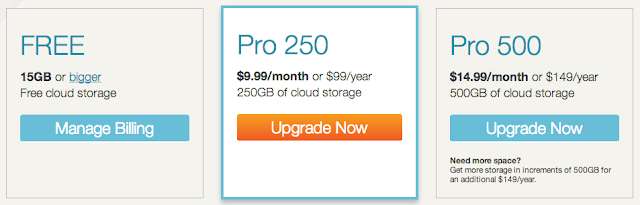
A few things that stand out is that Copy is offering support for Windows, Mac, and Linux computers right out of the gate - and I commend them for that. Also, both Android and iOS apps are available. Secondly, they offer an extremely generous referral program that gives both parties an extra 5GB for each referral! So if you sign up with a referral link, confirm your email address, and then install the software on your computer, iOS, or Android device you will get 20GB for free and I will get an extra 5GB. According to Copy this is a time-limited offer, so I am not sure how long you will be able to get this much space for each referral. Lastly, if you are willing to pay for one of the cloud storage services like Dropbox, SugarSync, Google Drive, SkyDrive, SpiderOak then this is one of the cheaper options available. As you can see in the image below, their prices are very reasonable compared to the competition.
As I have used Copy, it has worked seamlessly as Dropbox - no issues so far. I have tested the Windows, Mac, and Android apps as well as their online interface. When you drop a file or folder into your Copy folder it starts uploading immediately and will sync to your other devices in the background. It is an excellent alternative to Dropbox and they give you enough free space so that you could easily sync all your music or pictures between devices - something that would be difficult without a paid subscription on all the other cloud storage providers. So, go ahead and load up on free storage while you can.
Review Summary:
Item reviewed: Description: Cloud storage provider that has lots of free storage available.
Overall rating: 4 out of 5 stars.
Date published: 04/22/2013

SpiderOak Review - The Most Secure Cloud Storage Service


Overview

is a cloud storage and syncing service similar to Dropbox, Google Drive, or Copy. What sets SpiderOak apart from the others is their zero-knowledge policy regarding your data. All data is encrypted prior to being uploaded to SpiderOak's servers and you control the master encryption key derived from your password. While the other cloud storage providers mentioned seem to value ease of use and design over privacy and security, SpiderOak makes it clear the privacy is the most important thing to them. The fact that SpiderOak values privacy is excellent, but it would be nice if they made the application a little bit more intuitive.

Below are my review ratings. Overall SpiderOak receives a 3.9 out of 5 star rating.


Design = 3.5
Usability = 3
Security = 5
Performance = 4


Design and Usability

The interface is a little more difficult to navigate than Dropbox, and syncing everything does not happen automatically, so it takes a little bit more time to set up initially. In version 5 SpiderOak has a new folder called SpiderOak Hive that is automatically synced between devices similar to Dropbox's single folder. Unlike Dropbox you can backup any folder on your computer. Syncing other folders is a bit cumbersome as in order to sync data with other computers you first have to select folders to backup and then specify which specific folders to sync on each computer. However, once it is setup it works seamlessly as Dropbox - drop a file into one of your backed up folders and SpiderOak will begin to upload it and sync it to your other computers automatically.

Security and Performance

Because SpiderOak encrypts all data prior to uploading it and only stores your password locally (on your computer) in an encrypted format there is no evidence of your password on SpiderOak's servers. The files you upload are stored as just blocks of encrypted data. Essentially, once uploaded to the SpiderOak servers, it is not possible for anyone to access your data in a readable form - not SpiderOak staff, not even if someone were to hack their servers, not anyone but you. The downside of this is that if you ever forget your password your data will be lost forever as SpiderOak cannot recover or reset your password. You can read more about SpiderOak security here.

SpiderOak has a web portal that you can login to and view or download your files. I would discourage doing that because transmitting your password and viewing your files over standard web encryption protocols is much less secure. SpiderOak allows you to share files with others through ShareRooms that you can create and invite others to use. It is not as easy to use as other cloud services, but most likely you will be using SpiderOak for private data that you don't really want to share with others anyway.

In my testing performance has been decent. There is some room for SpiderOak to improve upload speeds, but it shouldn't slow down your workflow to any significant degree.

The standard data allowance is only 2GB but it is pretty easy to get more space for free. SpiderOak offers promotions from time to time that will give you extra free storage. If you sign up using a friend's referral link you will start out with an extra gigabyte of space. If you refer your friends you will get 1GB for each referral that signs up and downloads the SpiderOak software. You can get up to 10GB of extra space from referrals.

Conclusion

SpiderOak makes up for its somewhat unintuitive setup and outdated appearance by offering highly secured and private cloud storage. If data privacy is of the utmost importance to you, SpiderOak is hard to beat. It is great for keeping an electronic copy of important private documents that you want to keep secure.

If you found this review helpful, please let me know by sharing or by clicking the 1+ or "like" buttons. If you have any questions, please ask them in the comments section below.

Review Summary:
Service reviewed: SpiderOak
Description: Cloud storage provider with an unintuitive user-interface, but outstanding security.
Overall rating:3.9 out of 5 stars.
Published: 08/13/2012

2012 Airport Express Review - Better Performance, Less Portability

Apple Airport Express review
The New Airport Express provides significantly improved performance but slightly reduced portability.

Pros:
+ Extremely easy set-up.
+ The 802.11n simultaneous dual-bands provides better performance and range compared to the prior generation Airport Express.
+ Audio port for Airplay streaming and a USB port for network printing (unchanged from prior generation)

Cons:
- Not as well suited for travel as the previous generation (slightly larger form factor and it now requires a cord instead of just plugging into an electrical socket).
- No Gigabit Ethernet.


Set-Up:
To set-up all you have to do is open the Airport Utility on your Mac (you will need to install this if you are using a Windows PC), it will detect the Airport Express and guide you through the set-up process step by step. Even if you don't know anything about networking, you shouldn't have any problems getting started.

Design:
It is the same size as an Apple TV, so it is still quite small, but now requires a cord instead of plugging directly into an electrical socket.

Performance:
Compared to my previous generation AirPort Express this router has improved performance. The wireless speeds are excellent and the addition of the simultaneous dual bands has definitely improved performance over the previous generation. The range is more than adequate for a medium sized home.

Connectivity:
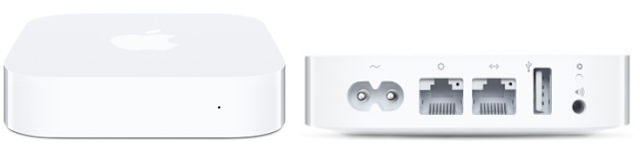
There is now an additional Ethernet port allowing for both wired and wireless connections. The Ethernet ports are both capable of 10/100BASE-T speeds (no gigabit Ethernet). Similar to prior generations there is a USB port that can be used to hook up a printer to be used on your network. Note that the USB port does NOT support an external hard drive like the Airport Extreme or Time Capsule do.

The audio port is similar to prior generations - capable of optical output with an optical cable or analog output with a regular 3.5mm cable. I use this optical cable to stream digital music via Airplay to my receiver - it sounds awesome and works perfectly from iTunes and iOS devices.

Summary:
If you plan to use the New Airport Express as your home router and don't want to spend the extra money for an Airport Extreme it is a great performing router with easy set-up, small form factor, and excellent features such as network printing and Airplay audio streaming. However, compared to the prior generation, this is no longer as easy to take with you while traveling for secure wifi in hotels. For travel I would give this 3/5 stars, for home use 5/5 considering the price and performance.


Review Summary:
Item reviewed: Apple Airport Express
Description: Excellent performance for the size and cost but offers less portability than previous generation.
Overall rating: 4 out of 5 stars.
Date published: 06/19/2012

Pioneer VSX-921-K Review and Proper Setup for the Best Sound

Pioneer VSX-921-K review
I bought the receiver along with Pioneer SP-BS41-LR bookshelf speakers, a Pioneer SP-C21 center channel speaker, and the Pioneer SW-8 subwoofer. I have been very happy with the sound quality - it is excellent for both music and movies.  Unfortunately, the user interface is very outdated.

Pros:
+ Excellent quality sound
+ Plenty of inputs
+ Automatic configuration with included microphone

Cons:
- Outdated user interface
- Not very intuitive - it takes reading the manual to figure out how to access a lot of the features


Performance:
In my opinion this is the most important thing to consider when buying a receiver - will it perform its function well?  Will it sound good? This receiver is capable of generating outstanding sound quality.  With the speakers that I have listed above, both music and movies sound excellent.  I have no complaints with my 5.1 channel setup with regards to sound performance. The overall sound output is quite accurate to my ears, with the lows, mids, and highs all equally represented. This will vary drastically with the speakers attached to this receiver, but it is capable of realistic audio playback.

User Interface:
The user interface looks like it was designed in the 80s - just white text on a black background. But, once you have everything set up, luckily you do not have to deal with the mediocre user interface very much since most of the time you will just be changing the volume and switching between sources which is quite painless.

Accessing many of the features often requires looking in the manual - some of the features are obvious on the remote, but others are a bit less intuitive.

Summary:
The Pioneer VSX-921-K provides excellent sound quality for both music and movies, but the user interface is very outdated and difficult to navigate.

How to Setup the VSX-921-K or Similar Receivers for the Best Sound:
After you have plugged in all of your speakers, setup is relatively easy with the included microphone - it will measure the levels from each speaker and modify their output accordingly. To do this, on the remote press the "receiver" button followed by the "setup" or "home menu" button.  Then select "Auto MCACC."

After the auto MCACC is completed, I highly recommend checking to make sure all the speakers other than your subwoofer are set to "small."  To do this again press the "receiver" button followed by the "setup" or "home menu" button.  This time select "Manual SP Setup" and then on the next screen, "Speaker Settings."  Now, make sure that all of your speakers are set to "SMALL" and the subwoofer is set to "YES."  If the speakers are set to "LARGE" then all of the audio frequencies will be sent to all of your speakers even if they cannot reproduce those frequencies resulting in muddy sound.  If all your speakers are set to "SMALL" and your subwoofer is set to "YES" then the low frequencies will be sent to the subwoofer and the higher frequencies to the rest of your speakers as intended.  Also, if your subwoofer has a frequency knob, turn it to include all frequencies - the receiver will decide which to send to the subwoofer.  You may need to move your subwoofer around the room to determine the best acoustic location - one easy way of determining this is to place the subwoofer in roughly the position you will be listening to it (watching movies/TV/etc) then walk around the room (in locations that are feasible to place the subwoofer), find the best sounding spot, and then place the sub at that location.
Review Summary:
Item reviewed: Pioneer VSX-921-K
Overall rating: 4.5 out of 5 stars.
Published: 06/03/2012

Refurbished Kindle Fire Review - An Excellent Tablet for the Price

 is an excellent tablet for the price. I purchased a refurbished Kindle Fire when it was the Gold Box deal of the day for $139 and have been very happy with it overall with a few small caveats.
Kindle Fire Review
Should you buy a refurbished Kindle Fire? I highly recommend it.  You get the same 1 year warranty as a new one, and I honestly could not tell that mine was refurbished.  When it arrived it was packaged as if it was new and there were no signs of use whatsoever - it looked brand new, and has worked perfectly ever since!
 Pros:
+ Inexpensive
+ Excellent, intuitive user interface
+ Nice high resolution IPS display
+ Performance - applications, media, and web browsing are fast
+ Tight integration with Amazon media services (video, music, books, etc.)
+ Minimalist design

Cons:
- Some applications in the Amazon App Store are not available for the Kindle Fire
- Besides music, Amazon Cloud Drive is not fully integrated into the OS
- No "advanced features" such as GPS, bluetooth, or wireless 3G (honestly, you can't really expect these at such a low price point)


Design:
The design is minimalist - the only thing on the front of the tablet is the display.  There is only 1 button (the power button) on the bottom of the tablet next to the micro-usb charging port.  There is a headphone jack on the other side of the micro-usb port.  There are two small speakers on the top of the device, but are barely noticeable as they are incorporated into the bezel. The back is made out of rubberized plastic which feels soft in your hands and is not slippery.

Hardware:
If you are reading this review you have probably already looked at the specifications - I won't rehash the processor speed, RAM, storage space, etc.  I will say that the processor and RAM are more than adequate for anything that I have done - applications load quickly and run well, videos and music play without any problems, and web browsing with the silk browser is fast.  I was worried that the 8Gb of storage (about 6Gb user available) on the device would not be enough, but since essentially everything but your applications is in the cloud, I have not even come close to maxing out the available storage.

User Interface:
I have plenty of experience with both Android and iOS devices. Before buying the Kindle Fire I was skeptical about the heavily modified android OS it uses. It turns out I was pleasantly surprised.  The "home screen" is much different than most android devices.  At the top there is a search bar and tabs for all of the Amazon services (newsstand, books, music, video, docs, apps, and web).  Underneath that is a carousel of recently used apps, and at the bottom are your favorites - these can be applications, specific web pages, books - pretty much anything you use often and want to put there. This works well as the web, applications, and all Amazon services are just one touch away.  The only downside to this is that there are no widgets unlike other android devices.  However, if you really like the typical Android OS home screen with widgets, you can install (via "side loading") a launcher (for example ADW.launcher EX is known to work well) that will create the typical home screen and allow widgets.

Amazon Products & Services:
The Kindle Fire OS was clearly designed to be integrated with all of Amazon's digital content. Any books, magazines, music, videos, or applications that you have purchased are available to you from the cloud and synced or streamed to your device seamlessly.  The built in applications for reading books or magazines, listening to music, and watching video work very well and are easy to use.

If you have an Amazon Prime account there are thousands of TV shows and movies to watch for free and books that you can borrow for free each month.  Any music you have bought from the Amazon's MP3 music store will appear on your device automatically. Any music you have bought through other services can be uploaded to your Cloud Drive and will then be playable from the Kindle Fire.  You get 5Gb of free storage space (the things you buy from Amazon do not count towards your 5Gb limit).  You can pay to get a larger cloud drive if necessary (20Gb is only $20/year) - if you go to any paid version of the cloud drive you get unlimited music storage (i.e. none of your music counts against your storage limit).

One thing that I was disappointed with is that non-music files in your cloud drive are not easily accessible.  Unlike music, which shows up immediately under the music tab in the OS, documents, pictures, videos, etc.that you have uploaded are not accessible except through the browser - no different than on your PC. I don't understand why the rest of the cloud drive is not integrated into the OS - perhaps it will be at some point, all it would take is a software update. There is a way to send documents via email to your Kindle Fire or through a new application that can be installed on your computer, for your Mac, or Windows.

Applications:
Since the Amazon App Store was launched it has come a long way in catching up to the apps available in the Google Play market.  Now, almost all of the major apps are available in both locations.  The Kindle Fire's built in web browser and email application work quite well.  I enjoy the "reading view" mode in the browser - it reformats the website's text into a kindle like format for easier reading without all of the extraneous sidebars, ads, etc. Unfortunately there is no built in calender application, although you can buy 3rd party applications, such as CalenGoo, that will work.

One of the most disappointing things I have come across using the Kindle Fire is that even though most applications are available in the Amazon App Store, some of them are not available for the Kindle Fire. For example some of the apps I use: Dropbox, Business Calendar, WeatherBug Elite, and FlightTrack are not currently supported by the Kindle Fire.  I assume this may be due to the fact that the Kindle Fire does not have some of the services built into the stock Android OS such as location or Google calender services, but I am not sure.  Some apps, such as Dropbox, are not supported by the Amazon App store for the Kindle Fire but actually work fine if they are "side loaded" but others will crash or not install if you attempt to install them outside of the Amazon App Store.  I imagine as time goes on this will improve as more app developers create Kindle Fire versions of their apps.

Summary:
If you already have an Amazon Prime membership or plan to get one, you cannot go wrong with the Kindle Fire.  It is an excellent, fast, well designed tablet for using Amazon services.  Most major Android apps are available and work great, but some applications are not supported by the Kindle Fire even though they are available to other devices in the Amazon App Store.
Review Summary:
Item reviewed: Kindle Fire
Overall rating: 4 out of 5 stars.
Published: 06/02/2012


Support : Creating Website | Johny Template | Mas Template
Copyright © 2011. Technology Share - All Rights Reserved
Template Created by Creating Website Published by Mas Template
Proudly powered by Blogger